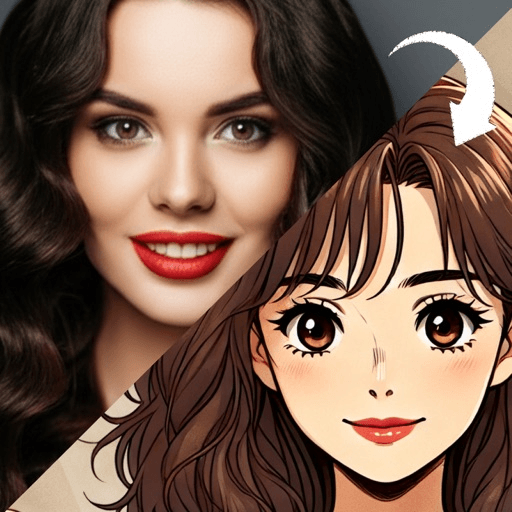
A good cartoon profile picture survives being shrunk to a circle about forty pixels across. Three things make that possible: a clear silhouette, strong contrast between your face and the background, and one readable feature such as your hair shape or your glasses. Choose a look that keeps those three, crop the head high, and check it at actual size.
Almost every idea below is a variation on those three rules. The looks differ a lot, but the reason one reads at a glance and another turns to mush in a comment thread is nearly always the same.
What makes a cartoon profile picture readable when it is tiny?
Think about where your picture actually appears. Wikipedia’s entry on avatars describes them as graphical representations of a user that, in forums and other online communities, take the form of two-dimensional icons, also known as profile pictures, pfps or userpics. Icons is the right word. Most of the time nobody sees your profile picture at full size. They see it next to a message, in a list, or stacked beside twenty others.
At that size, detail disappears first. What survives is:
- Silhouette. The outline of your head and hair against the background. There is a long tradition behind trusting the outline: Wikipedia notes that cutting portraits, generally in profile, from black card became popular in the mid-18th century, and that the name silhouette comes from Étienne de Silhouette, a French finance minister in 1759. A portrait with no interior detail at all was enough to be worth framing.
- Contrast. Your face and hair need to separate from what is behind them. Tate defines complementary colors as pairs that contrast with each other more than any other colors and make each other look brighter when placed side by side. A background in the complement of your hair or top is the fastest contrast win there is.
- One feature. Big curls, round glasses, a wide grin, a bright hoodie. One thing a friend could spot in a crowd of thumbnails.
With that in mind, here are the ideas, each paired with the face and the setting it suits.
Cartoon profile picture ideas, one look at a time
1. Retro cartoon on a flat, loud background
The retro cartoon filter look uses bold outlines and a handful of flat, saturated colors, which is exactly what survives shrinking. Put it on a single bright background color, no scenery. It suits almost any face and works best for people with a clear expression, since the look runs on big shapes and confident mouths.
2. 3D cartoon avatar on a dark ground
A 3D cartoon avatar has real highlights and cast shadows, so it holds up on dark-mode apps where flat styles can sink into the background. It flatters rounder faces and big smiles, and it is the safest choice if you are not sure what you want.
3. Voxel avatar for a gaming handle
A voxel art avatar builds your head out of visible cubes. That sounds like it would lose you, but the blocky outline is so distinctive that it reads instantly at small sizes. It suits simple, strong features and short or very defined hair better than long, fine hair.
4. Anime style with one accent color
The anime style filter keeps human proportion and gives you large clean eyes and a single hard shadow. For a profile picture, pick one saturated accent, a hair color or a background, and let everything else stay quiet. It suits faces where the eyes are the strongest feature. What that conversion keeps and replaces is covered in detail in what photo to anime actually changes.
5. Storybook illustration, cropped tight
The storybook illustration look is soft and warm, which makes it one of the friendliest profile pictures you can have. Soft edges lose detail when shrunk, so crop it tighter than you would another style: forehead to chin should fill most of the circle. Good for a parent, a teacher or anyone who wants to look approachable.
6. Pop art portrait with a complementary background
A pop art portrait is flat color, heavy outlines and printed-dot texture. Tate describes pop art as a movement that emerged in the 1950s and flourished in the 1960s in America and Britain, drawing on popular and commercial culture, and the look still carries that advertising-poster confidence. Pair a warm face with a cool background, or the reverse. It suits big personalities and big hair.
7. Comic book filter with a heavy outline
The comic book filter look is ink line, strong shadows and bold color. The thick outline is what makes it a good avatar, since it draws your silhouette for you. It rewards strong bone structure and faces photographed with light from one side.
8. Chibi head only
A chibi avatar shrinks the body and enlarges the head until your face fills most of the frame, which is ideal for a circle crop. Use the head and shoulders only. The full-body version wastes most of the circle on a tiny body. More on the proportions in what chibi style is.
9. Pixel art at a deliberately low resolution
A pixel art filter look works as a profile picture only when the pixels are big and few. A fine pixel grid just looks like a blurry photo when shrunk. Go chunky, keep the palette small, and it reads as intentional.
10. Cyberpunk avatar with neon rim light
The cyberpunk avatar look places your face against a dark ground with bright magenta and cyan edge light. That rim of light draws your silhouette in color, which is why it reads so well small. It suits anyone with a strong jaw or distinctive hair outline, and it looks at home on gaming and music profiles.
11. A gentle caricature
The caricature generator approach pushes your most distinctive feature. At thumbnail size that is a feature, not a joke: the exaggerated part is what people recognize first. Keep it affectionate, and push something you chose, like glasses or hair, rather than something you were born with. If you would rather draw it yourself, how to draw yourself as a cartoon walks through picking that feature.
Which looks do not work as a profile picture?
Honesty helps here. Two families that are lovely at full size tend to fail small.
A pencil sketch filter look is fine lines and gray tone with no color, and at forty pixels it becomes a gray smudge. Keep it for a banner or a post.
A watercolor portrait look relies on soft, bleeding edges and pale color. Lovely printed, weak as an icon, unless you crop very tight and choose a strong background.
How should you crop and check a cartoon profile picture?
Three final steps, whichever look you pick:
- Crop for the circle. Most apps crop to a circle. Put your eyes about a third of the way down, leave a little air above your hair, and let the shoulders run off the bottom edge.
- Shrink it before you post. Look at it at the size a stranger will see it: zoom your screen out or view it in a message preview. If you cannot tell it is you, it is not ready.
- Try two or three looks. Running the same photo through looks from different families shows you quickly which one suits your face. The photo advice in how to turn a photo into a cartoon matters more than any of these ideas, because a close, evenly lit photo gives every look something to work with.
Toonsta is built for that last step. It ships five of the looks above, the retro cartoon filter, the 3D cartoon avatar, the voxel art avatar, the anime style filter and the storybook illustration, so you can run one photo through two or three of them, check each at thumbnail size, and keep the one that still reads as you. The other looks here are explained on their style pages as reference.